How Businesses Can Use Claude for Legal Work: Contracts, Document Review, and Better Preparation
Claude can do a lot more than write emails. For businesses without a legal team, it can be a capable legal work assistant, as long as you add verification where the stakes are higher.
Key takeaways:
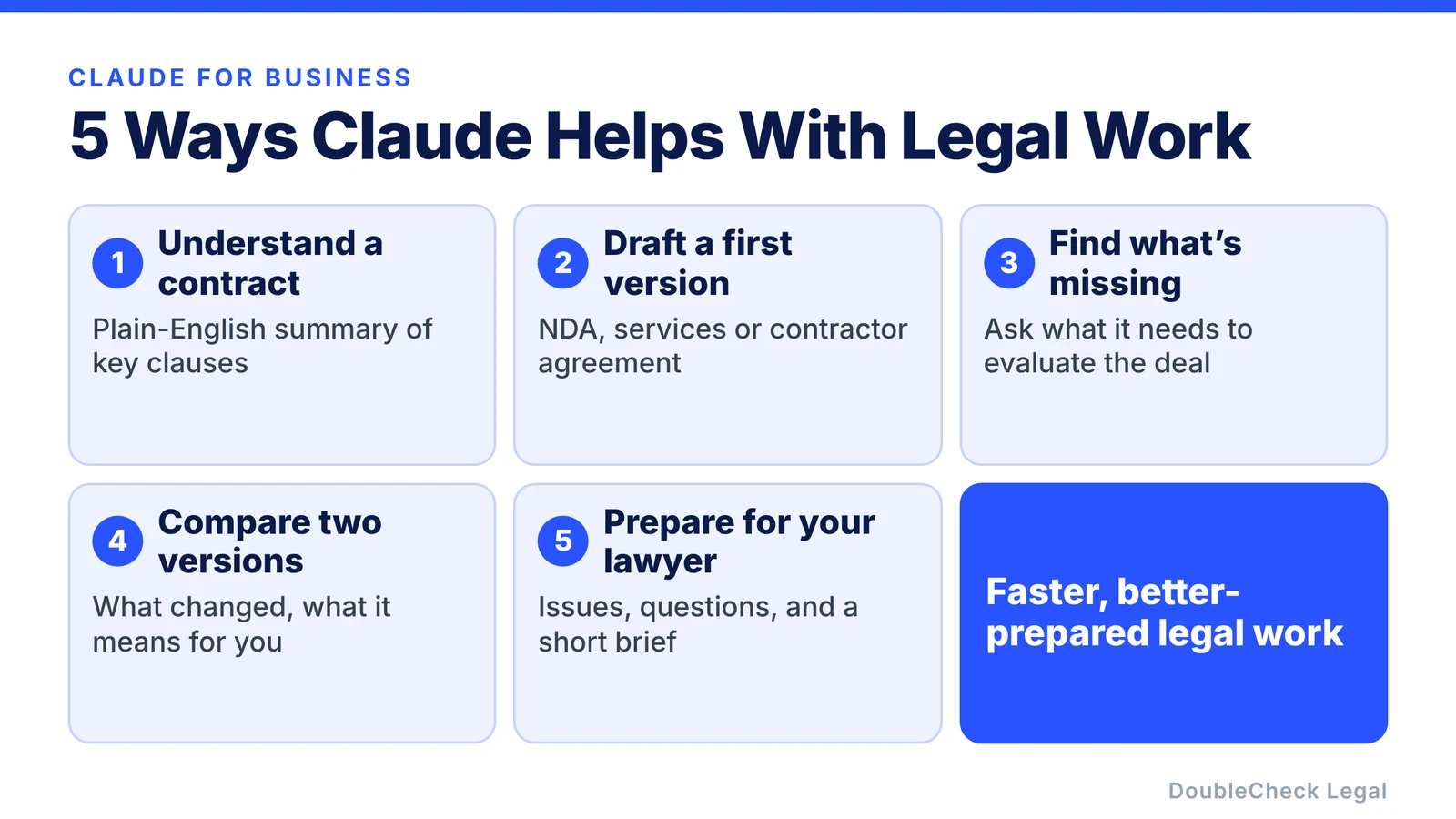
- Claude can explain contracts, draft first versions, compare redlines, flag missing information, and help you prepare for a lawyer.
- It can still misread a clause, miss context, or sound more certain than it should.
- Always tell it your state, ask for sources, and separate what a document says from what the AI thinks it means.
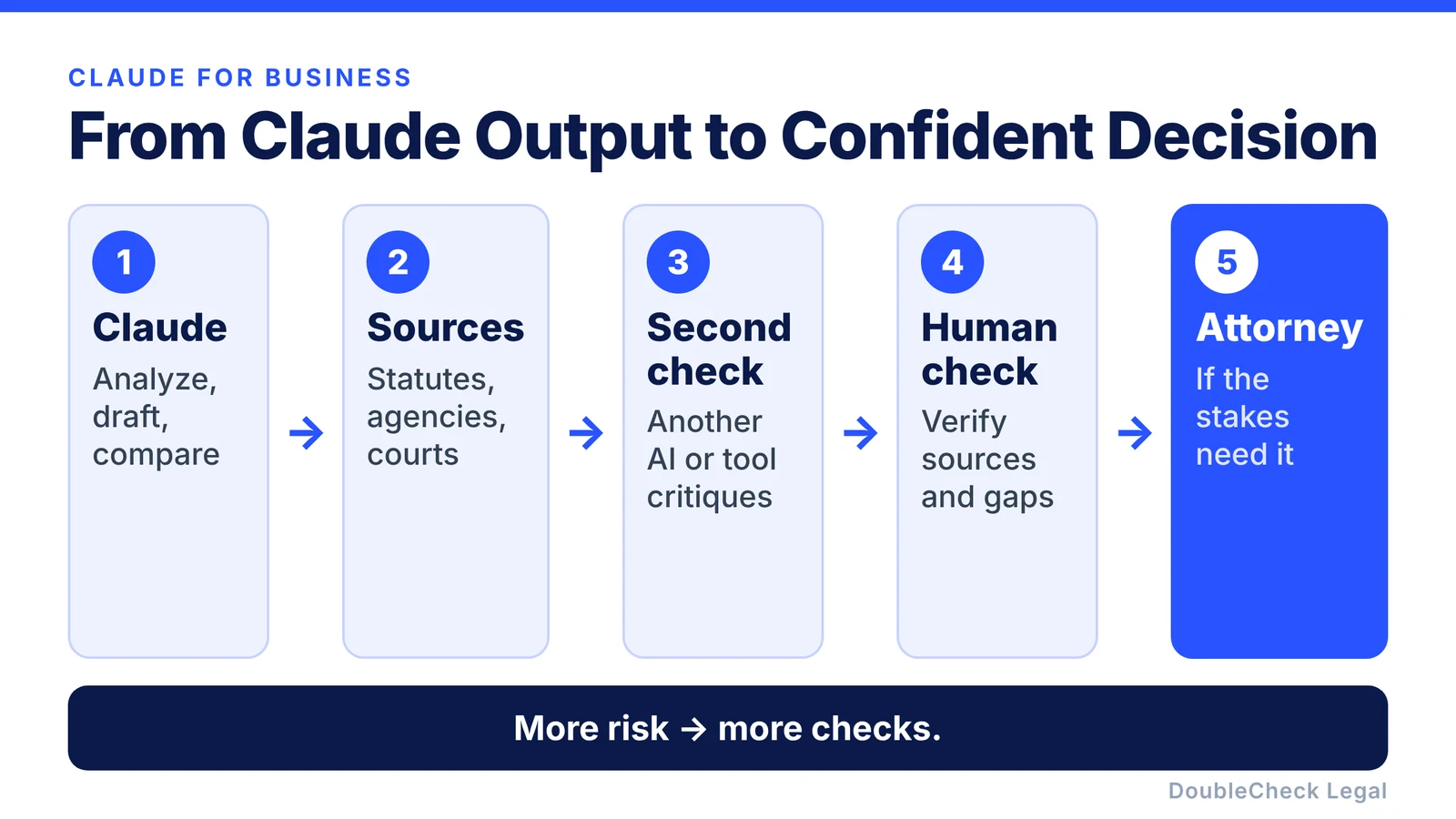
- Use a chain of checks: Claude, then sources, then a second check, then a human, then an attorney if the stakes call for it.
For a small business, startup, agency, restaurant, consulting firm, or software company, Claude can help with everyday legal work such as:
- understanding a contract,
- drafting a first version of an agreement,
- comparing two documents,
- explaining complicated clauses,
- identifying missing information,
- preparing questions before speaking with an attorney,
- and organizing a large amount of legal or business information.
That can save time and reduce the basic work a business needs to do manually.
But Claude is still an AI system. It can misunderstand a document, miss important context, rely on incomplete information, or give an answer that sounds more certain than it should.
The right approach is not to avoid Claude. It is to use it as a legal work assistant, adding source verification and human review when the stakes are higher.
Why Claude can be useful for business legal work
Claude is well suited to situations where a business needs to work through a lot of text and context. For example, you might give it:
- a customer agreement,
- your existing terms,
- an NDA,
- a statement of work,
- several contract versions,
- internal notes,
- and a description of the deal.
Then ask it to organize the information and explain what changed. That makes Claude useful for businesses that regularly deal with contracts but do not have a full-time legal team. A founder or business owner can get much further before deciding whether professional legal help is needed.
1. Use Claude to understand a contract before signing it
One of the simplest uses is contract explanation. Instead of reading a 30-page agreement and interpreting everything yourself, ask Claude to summarize:
- payment obligations,
- termination rights,
- renewal terms,
- liability,
- confidentiality,
- intellectual property,
- warranties,
- indemnification,
- governing law,
- and other important provisions.
A useful prompt:
“I run a small software company. Please summarize this agreement in plain English and identify the clauses that could create the biggest obligations for my business. Do not assume anything that is not in the document.”
That last instruction matters. You want the model to distinguish between what the contract actually says and what it thinks might matter.
2. Use Claude to draft the first version of a business agreement
Claude can help prepare an NDA, consulting agreement, contractor agreement, customer agreement, simple services agreement, internal policy, or statement of work. The important thing is to give it context.
Instead of:
“Write me an NDA.”
try:
“I run a California software startup. We are sharing confidential product and technical information with a potential commercial partner. We want a mutual NDA. Please create a first draft and clearly identify any information you still need from me.”
That is much more useful. The AI is not just generating text. It is helping you understand what information the document depends on.
3. Ask Claude to identify what is missing
This is one of the most useful ways for a business to work with AI. Do not only ask:
“Is this contract good?”
Ask:
“What information would you need before you could properly evaluate this agreement?”
Claude might point out missing context such as:
- the state involved,
- whether the relationship is employee or contractor,
- the length of the engagement,
- who owns the intellectual property,
- whether certain terms have already been negotiated,
- or how much money is involved.
That does not mean every item it lists is legally required. But it helps you discover the questions you should be asking.
4. Use Claude to compare two versions of a contract
Contract comparison is another strong use case. Give Claude the original and the revised version and ask:
- What changed?
- Which changes favor us?
- Which changes increase our obligations?
- What provisions were removed?
- What new risks or responsibilities were introduced?
- Which changes deserve closer review?
For founders and small businesses negotiating customer or vendor contracts, this can save substantial time. Claude can turn a complicated redline into a much simpler business summary.
5. Use Claude to prepare before talking to a lawyer
Claude can also make professional legal help more efficient. Before speaking with an attorney, use it to:
- summarize the issue,
- organize the relevant documents,
- identify the questions you want answered,
- list the clauses you are concerned about,
- and prepare a short brief explaining the transaction.
Then, instead of spending the start of a consultation reconstructing the situation, you can open with a clear explanation:
“We are signing a $75,000 annual SaaS agreement with a new customer. We are most concerned about liability, IP, termination, data security, and payment. Here are the agreement and our notes.”
That is far more useful than sending an attorney a document with no explanation.
Where Claude can go wrong
Claude is strong with long documents, structured explanations, drafting and rewriting, comparisons, and context-heavy analysis. But none of those strengths eliminates AI risk. Like other generative AI systems, Claude can:
- misunderstand a clause,
- overlook an exception,
- confuse jurisdictions,
- provide outdated information,
- overstate a conclusion,
- or invent a source or legal principle.
That is why businesses should distinguish between document analysis and verified legal conclusions. If Claude tells you what a paragraph literally says, that is relatively easy to check. If it tells you:
“This is enforceable in your state.”
that is a different level of claim and deserves much stronger verification.
Habits that make Claude safer for legal work
Always tell Claude where your business operates. Legal requirements vary by jurisdiction. For employment, leases, business formation, privacy, consumer issues, contracts, or regulatory questions, give the relevant state or location:
“Our company is incorporated in Delaware, operates in California, and this employee works in California.”
Claude cannot account for information you never provide.
Ask Claude for sources. When the question involves legal rules rather than simply explaining a document, ask:
“What authoritative sources support this?”
Then check them. Look for primary or official materials such as statutes, regulations, government agencies, courts, and official guidance, and make sure the source actually supports the AI’s conclusion. An AI-generated citation is not the same thing as a verified source.
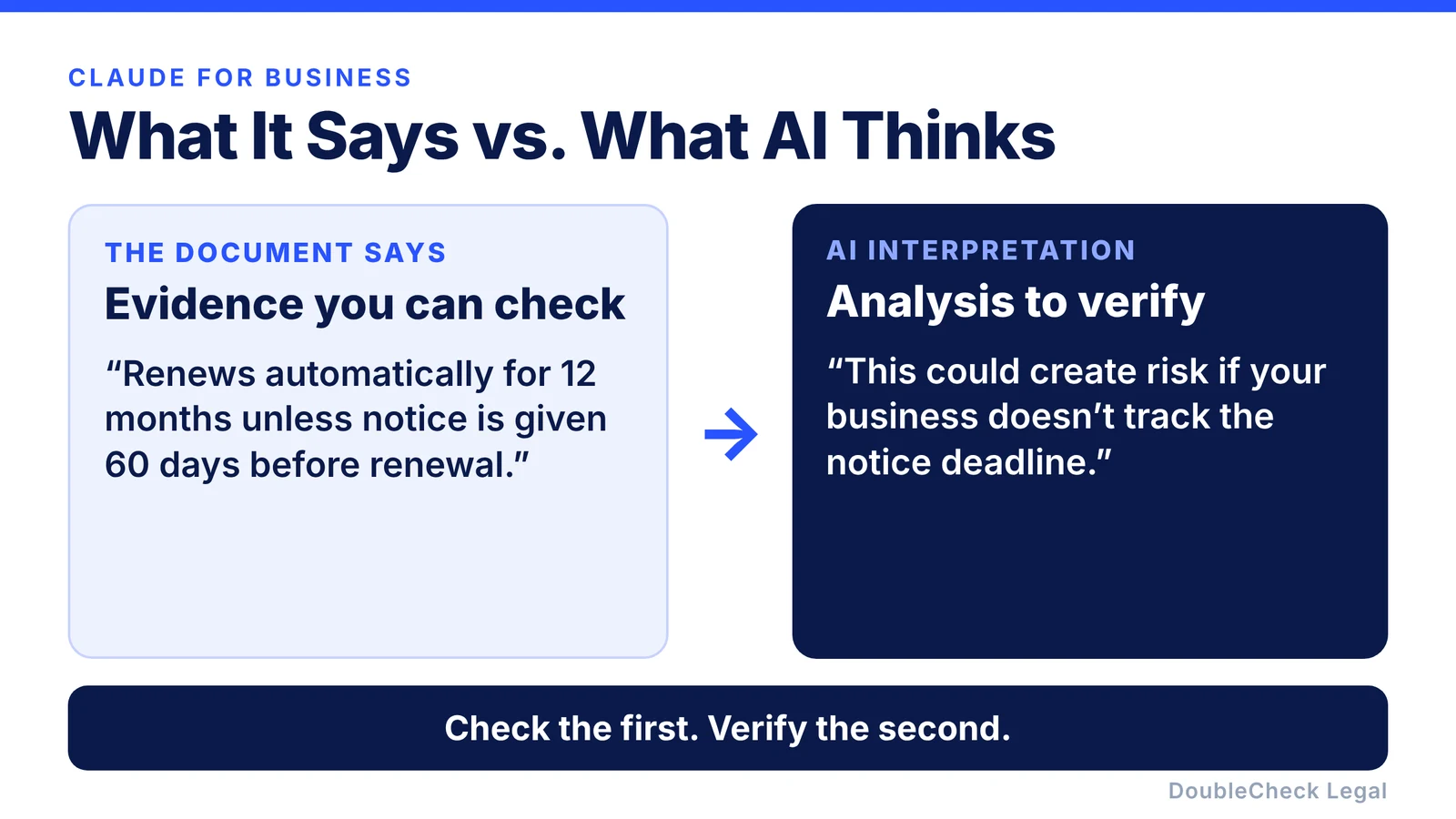
Ask Claude to separate facts from interpretation. A very useful instruction is:
“Separate what the document or source explicitly says from your interpretation.”
For example, the document may say the agreement automatically renews for another 12 months unless notice is given 60 days before renewal. The AI’s interpretation might be that this creates an operational risk if your business does not track the deadline. That distinction helps you see which part is evidence and which part is analysis.
Do not use Claude as the only check for high-risk decisions
Claude can help a business do much more legal preparation itself. But some issues deserve another level of review. Be especially careful around:
- founder ownership,
- fundraising,
- intellectual property,
- hiring or firing employees,
- major customer contracts,
- commercial leases,
- disputes,
- regulatory obligations,
- taxes,
- or any transaction where a mistake could cost the business significant money.
A useful workflow is Claude → sources → second check → human review when appropriate.
How DoubleCheck can enhance a Claude legal workflow
Claude can give you a strong first layer of analysis. The harder problem is knowing:
- whether the answer is supported,
- whether the source applies to your state,
- whether something important is missing,
- whether the source is still current,
- and when to stop relying on AI alone.
That is where DoubleCheck adds another layer. A business can use Claude to draft or analyze a document, then bring the work into DoubleCheck to:
- cross-check important claims,
- surface supporting sources,
- compare information across multiple sources,
- identify missing context,
- flag statements that deserve more verification,
- and create a clearer verification workflow around the AI output.
The goal is not to replace Claude. It is to make AI-assisted legal work more trustworthy.
Sometimes you may also want another person to look at the work. DoubleCheck supports optional human verification: a reviewer can verify sources, add missing ones, flag unsupported AI claims, and annotate areas that deserve additional attention. If the issue calls for professional legal advice, you can choose to connect with an attorney. Escalation becomes optional rather than automatic.
That gives small businesses more control over both cost and risk.
FAQ
Is Claude good for legal work?
Claude can be useful for contract summaries, drafting, document comparisons, explanations, and preparing questions. Businesses should still verify important legal conclusions and sources.
Can Claude review a contract?
Yes. Claude can help summarize provisions, identify clauses that deserve attention, compare versions, and explain language. That does not guarantee it will identify every legal issue.
Can Claude draft a contract for my business?
Claude can create a first draft based on the information you provide. The quality of the draft depends heavily on the context and instructions you give it. Important agreements may still benefit from professional review.
Is Claude better for contracts than ChatGPT?
Both can be useful. Claude can be particularly convenient for long, document-heavy tasks, while ChatGPT can be strong across a broad range of business workflows. The right choice depends on the specific task rather than the brand alone.
Can Claude give legal advice?
Claude can provide information, explanations, and drafting assistance, but a business should not assume that an AI response is equivalent to advice from a qualified attorney who understands the specific facts and jurisdiction.
How can I make Claude safer for legal work?
Provide complete context, specify your jurisdiction, ask it to identify assumptions, request authoritative sources, separate source material from AI interpretation, and verify higher-risk conclusions independently.
Should I have a lawyer review something Claude drafted?
For important agreements or decisions where a mistake could materially affect the business, professional review can provide an additional layer of judgment and accountability.
Can DoubleCheck verify work created with Claude?
DoubleCheck is designed to add a verification layer around AI-assisted legal work by helping surface sources, cross-check information, identify missing context, add human verification, and optionally connect the business with an attorney when needed.
General information only. This article is not legal, tax, or accounting advice.