How Small Businesses Can Use AI for Legal Work Without Taking Unnecessary Risks
AI can now explain a lease clause, draft a customer policy, or summarize an employment document for a small business in seconds. The risk isn’t using AI for legal work — it’s trusting a confident-sounding answer without a layer of verification. This is general information, not legal, tax, or accounting advice.
Key takeaways:
- AI is strong at understanding, organizing, drafting, comparing, and preparing — weaker the moment you treat a confident answer as automatically correct.
- Always tell the AI what state (and city) your business operates in — legal rules vary by jurisdiction, and a correct answer in one state can be wrong in another.
- Ask for sources, then check whether those sources are still current and actually support the claim.
- Match the level of review to the level of risk: one AI answer may be enough for a summary; employment, ownership, or financing decisions deserve more verification.
Small business owners are already using AI for more than marketing and customer service.
A restaurant owner might ask AI to explain a lease clause. A mechanic shop might use it to draft a customer policy. A pizzeria might ask it to summarize an employment document. A consultant might use it to create a first draft of an agreement.
That can save time and money.
But legal work is also one of the areas where an AI answer can look convincing even when it is incomplete, outdated, or wrong.
The right approach is not to avoid AI.
It is to use AI as a first layer of help, then add reliable sources and human review where the consequences of a mistake are higher.
How small businesses can use AI for legal work
AI can be useful for many everyday business tasks, including explaining legal terminology, summarizing contracts, drafting a first version of a document, comparing two agreements, creating a checklist, preparing questions before speaking with a professional, organizing business information, identifying clauses that deserve a closer look, and turning a complicated document into plain English.
For a small business without an in-house legal team, that can be valuable.
Instead of paying someone simply to explain every basic concept, you can use AI to become better informed before deciding what deserves professional attention.
Where AI is especially useful
AI works well when the task is primarily about:
Understanding — “What does this clause mean?”
Organizing — “What documents do I need before signing this deal?”
Drafting — “Create a first draft of a basic customer agreement.”
Comparing — “What changed between version one and version two?”
Preparing — “What questions should I ask before renewing this lease?”
These are often high-value, lower-friction ways to use AI.
The problem begins when the user assumes that a polished answer is automatically a legally correct answer.
The biggest weakness: AI can confidently be wrong
Current AI models are powerful, but they still make mistakes. They can hallucinate a rule, cite something that does not exist, misunderstand a document, miss an exception, apply a rule from the wrong jurisdiction, rely on outdated information, or state something uncertain as if it were obvious.
That matters because small businesses are often dealing with rules that vary by state, city, industry, company structure, employee status, transaction type, or contract language.
An answer that is correct for a business in one state may not be correct for another.
Always check the jurisdiction
One of the most important habits when using AI for legal work is to tell the model where your business operates.
For example, do not simply ask:
“Can I terminate this employee?”
A better question is:
“I run a small business in California. This employee works full time in California. Here is the relevant policy and employment agreement. What issues should I investigate, and what sources should I check?”
The difference is important. Legal rules can vary substantially between states, and sometimes between cities. If your business operates in more than one state, tell the AI that too.
Check whether the information is current
Legal and regulatory information changes. A rule that was correct two years ago may have changed.
So when AI gives you a conclusion, ask:
“What is the source for this?”
Then ask:
“Is this source still current?”
For important questions, look for authoritative materials such as state government websites, federal agencies, statutes, regulations, courts, and other official sources.
A blog or old article can be useful for context, but it should not automatically be treated as the final authority.
Cross-check important claims
For low-risk questions, one AI answer may be enough to help you understand the issue.
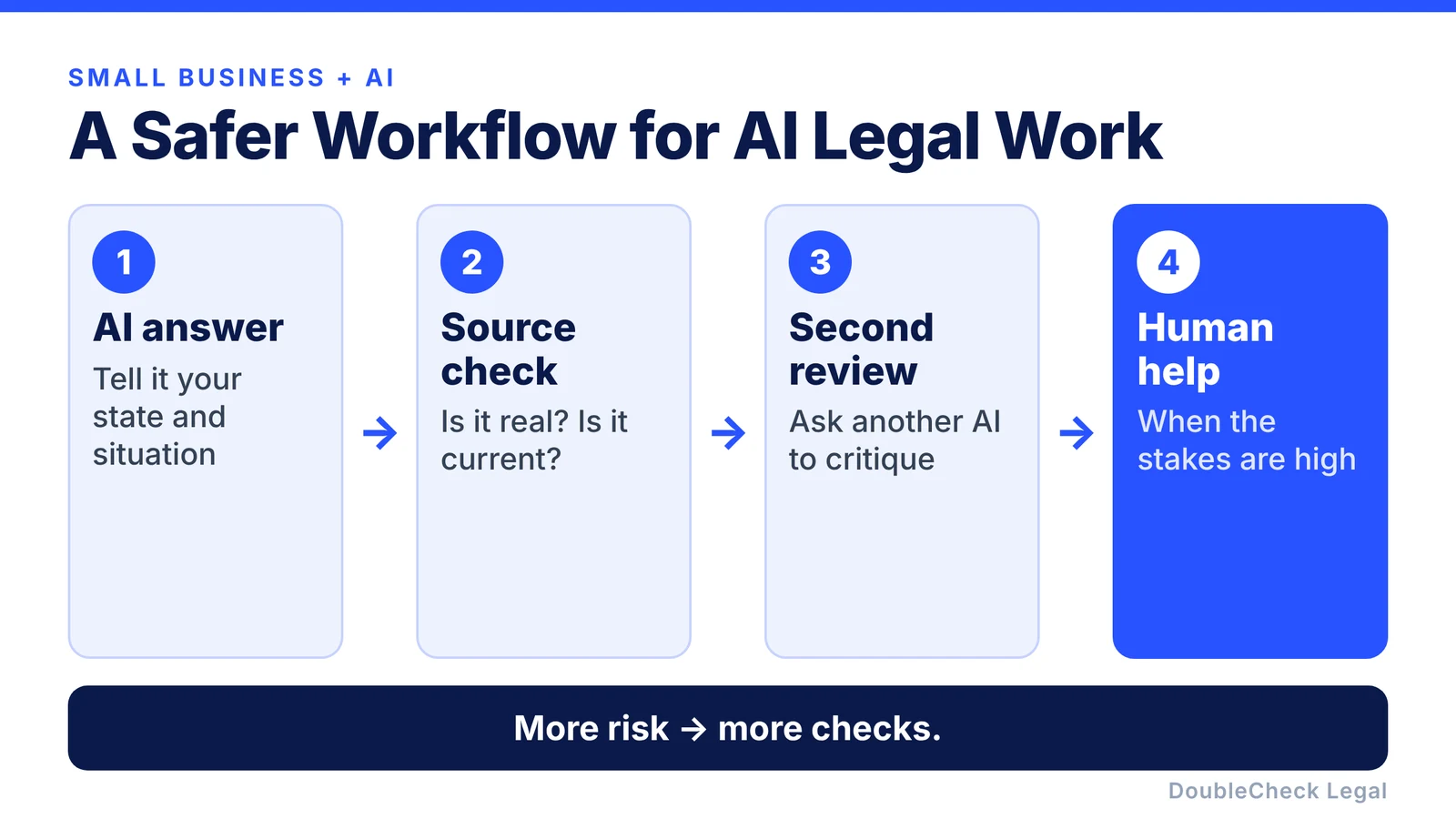
For higher-risk questions, add another layer. A simple workflow is:
AI answer → source check → second review → human help if needed
For example, if an AI drafts a contract clause, you can ask another AI:
“Review this clause and identify anything ambiguous, unusually broad, or inconsistent.”
If the models disagree, that is useful information. It tells you the issue deserves more attention.
Know which tasks are higher risk
Not every legal task carries the same consequences.
Using AI to summarize a document is different from relying on AI to make a major decision about employment, ownership, financing, intellectual property, a high-value contract, a dispute, taxes, regulatory obligations, or a major lease.
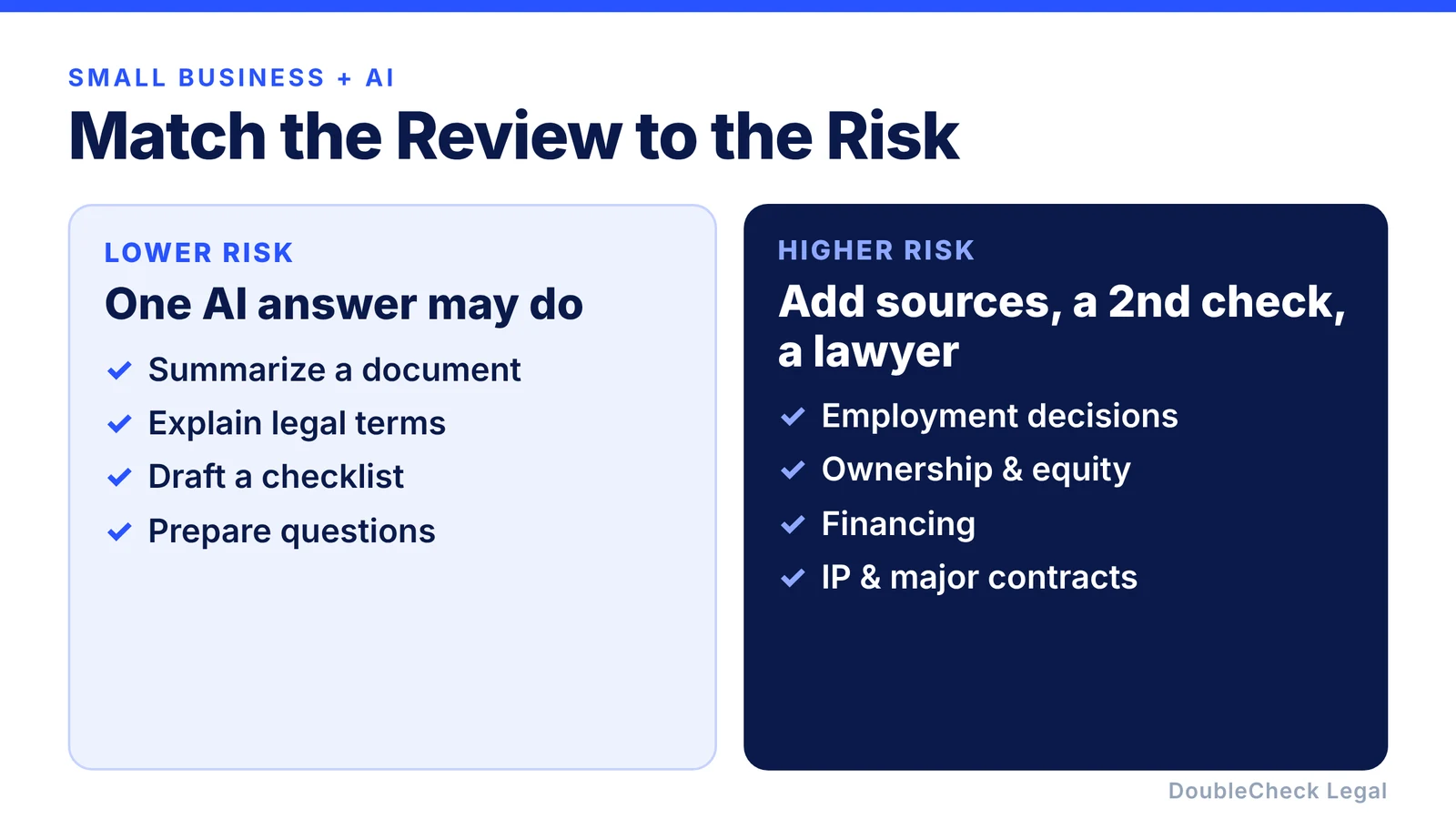
The more expensive the mistake could be, the more verification you should add.
That does not necessarily mean hiring a lawyer for every question. It means matching the level of review to the level of risk.
Use AI to reduce legal costs, not to create hidden risk
Used well, AI can reduce the amount of professional time you need. For example, you can use AI to understand the issue, organize the facts, collect the relevant documents, identify the questions, review the sources, and only then involve a lawyer if needed.
That means the professional conversation can focus on the difficult parts instead of spending time establishing basic context.
For a small business, that can make legal help more efficient.
Why ordinary AI chat is not always enough
A normal AI chatbot is optimized to give you an answer. But for legal work, you often need more than an answer.
You need to know: What source supports this? Is the source current? Does it apply in my state? What information is missing? What parts are uncertain? Is the AI making an assumption? Should someone else check this?
That is the gap DoubleCheck is designed to address.
Instead of giving you only a generated response, DoubleCheck can help create a more structured legal workflow around the answer.
How DoubleCheck can help small businesses use AI more safely
DoubleCheck is designed to make AI-assisted legal work easier to verify.
The platform can help cross-check information across multiple sources, surface authoritative sources, identify when information may be missing, distinguish source material from AI interpretation, organize documents and questions, flag areas that deserve additional checking, and give small businesses a clearer next step.
The goal is to make AI more useful without asking the business owner to blindly trust it.
Work through your legal documents with DoubleCheck
Human verification when you want another layer
For some questions, AI and sources may be enough. For others, you may want another person to check the work.
DoubleCheck can also support optional human review. Depending on the workflow, a human reviewer may help confirm whether a source supports a claim, identify missing sources, flag unsupported AI statements, add research notes, or point out areas that deserve closer review.
That can include trained legal professionals or supervised support professionals where appropriate.
The important distinction is that source checking and informational review are not automatically the same thing as legal advice. The platform should make that distinction clear.
And if you need a lawyer, that can remain optional
Sometimes the right next step really is to speak with an attorney.
If you are dealing with a major contract, financing, ownership issue, employment problem, dispute, regulatory question, or another high-stakes matter, professional advice may be appropriate.
But that does not need to be the starting point for every question. A better sequence can be:
Ask AI → understand the issue → check the sources → improve the work → add human verification → talk to a lawyer if needed.
That gives small businesses more flexibility.
The goal is not to replace lawyers
The goal is to make everyday legal work less confusing.
Small business owners should be able to understand more of their own business documents, prepare better questions, organize information, and avoid paying professional rates for every basic step.
AI can help with that. But the safest version of AI legal work combines:
good AI + reliable sources + verification + human judgment when necessary.
That is the model DoubleCheck is building toward.
FAQ: AI for Small Business Legal Work
Can a small business use AI for legal documents?
Yes. AI can help with drafting, summarizing, comparing, and explaining business documents. Important outputs should still be checked before the business relies on them.
Can AI help reduce legal costs for a small business?
Potentially. AI can handle preliminary research, document organization, first drafts, summaries, and preparation, which can reduce the amount of professional time needed later.
What is the biggest risk of using AI for legal work?
The biggest risk is relying on an answer that sounds convincing but is incomplete, outdated, unsupported, or based on the wrong jurisdiction.
How do I know whether an AI legal answer is correct?
Ask for the underlying sources, verify that those sources are authoritative and current, make sure they apply to your state or situation, and add human review where the consequences of an error are significant.
Should I tell the AI what state my business is in?
Yes. Many legal requirements vary by jurisdiction, so the state, city, and sometimes industry can materially affect the answer.
Can I use ChatGPT, Claude, or Gemini for business legal work?
They can all be useful for understanding, drafting, summarizing, and organizing information. None should be treated as automatically correct simply because the response is detailed or confident.
When should a small business talk to a lawyer?
Consider professional advice when the issue is high-stakes, highly customized, disputed, difficult to verify, or could materially affect ownership, employees, financing, intellectual property, major contracts, or regulatory obligations.
What does DoubleCheck add beyond a normal AI chatbot?
DoubleCheck is designed around verification: richer source coverage, cross-checking, clearer source attribution, identification of missing information, optional human review, and access to attorneys when professional help is actually needed.
General information only. This article is not legal, tax, or accounting advice.