AI Agent vs. Chatbot for Legal Work: What Business Owners Should Know
A chatbot answers a question. An AI agent can work through a multi-step task. Here is what that difference means for legal work, and why approvals and sources still matter.
Key takeaways:
- A chatbot answers; an agent can search, use tools, compare, draft, and return work for review.
- Agents have five pieces: a model, instructions, context, tools, and human approval.
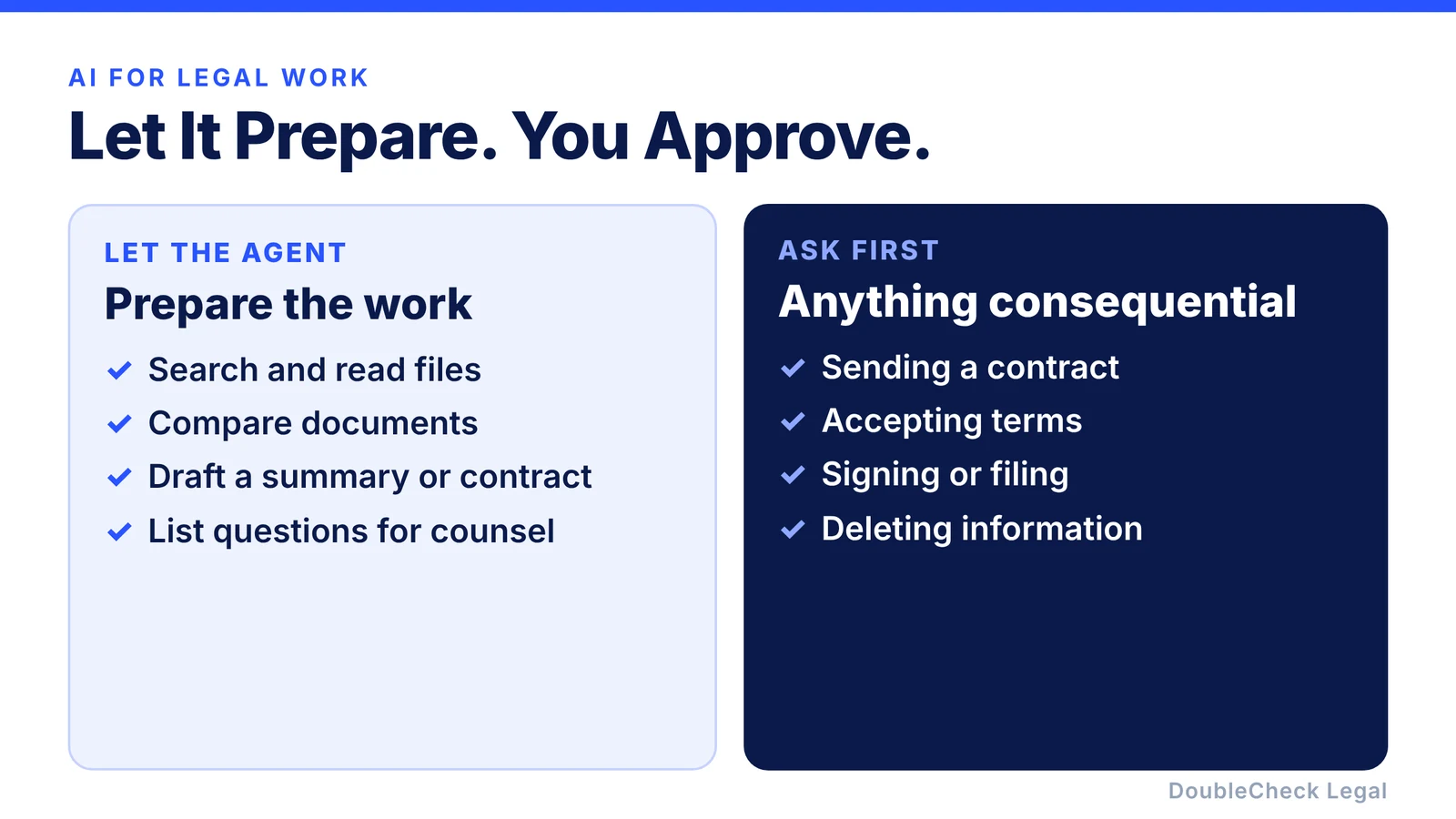
- Let agents research, analyze, and draft. Require approval before anything consequential.
- One early error can compound across steps, so ask for sources behind every conclusion.
- Start with limited, read-only permissions and share only what the task needs.
You have probably already used ChatGPT or Claude for a legal question. You paste in a contract, ask what it means, and get an answer in seconds. That is useful. But AI can increasingly do something more interesting: work through a task. For legal work, that changes what you can ask for, and what you need to double-check.
What is the difference between a chatbot and an AI agent?
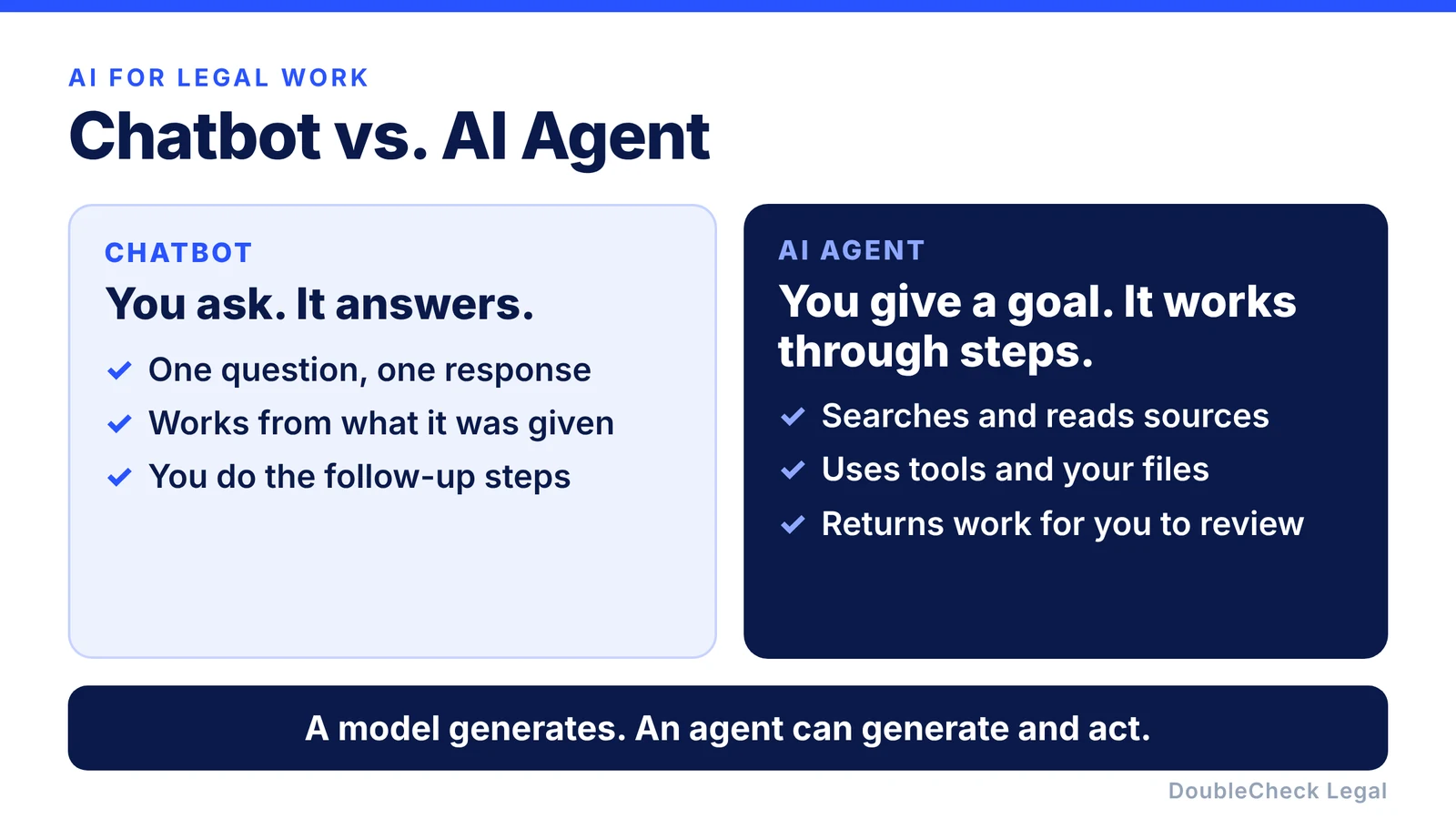
An AI model generates. An AI agent can generate and act through a workflow.
With a chatbot, the pattern is simple: you ask, it answers. “What does indemnification mean?” gets an explanation. “Draft an NDA” gets a document.
With an agent, it looks more like: you give an objective, the agent decides what information it needs, uses tools, examines the results, takes another step, and returns finished work for you to review.
That does not automatically make an agent smarter. It makes it able to do more than produce text. For a business owner, that is the difference between asking “what does this clause mean?” and asking the AI to review an agreement, compare it with your last one, research the questions that depend on current law, show its sources, summarize the biggest risks, and prepare questions for an attorney.
A simple legal example
Say you receive a new customer agreement. With a chatbot you upload it and ask, “Review this contract.” You get an answer.
With an agentic workflow, you could instead say:
“Review this customer agreement. Compare it against our standard agreement. Identify every material difference. Find the governing-law provision. Research any issue that appears jurisdiction-dependent using authoritative sources. Create a table of the five biggest differences. Then prepare questions for an attorney. Do not modify or send anything without my approval.”
The agent now has an objective rather than a single question, and completing it takes several tasks. That is the key difference.
The five pieces of an AI legal agent
You do not need to be an engineer to understand how this works. Think of an agent as five basic components.
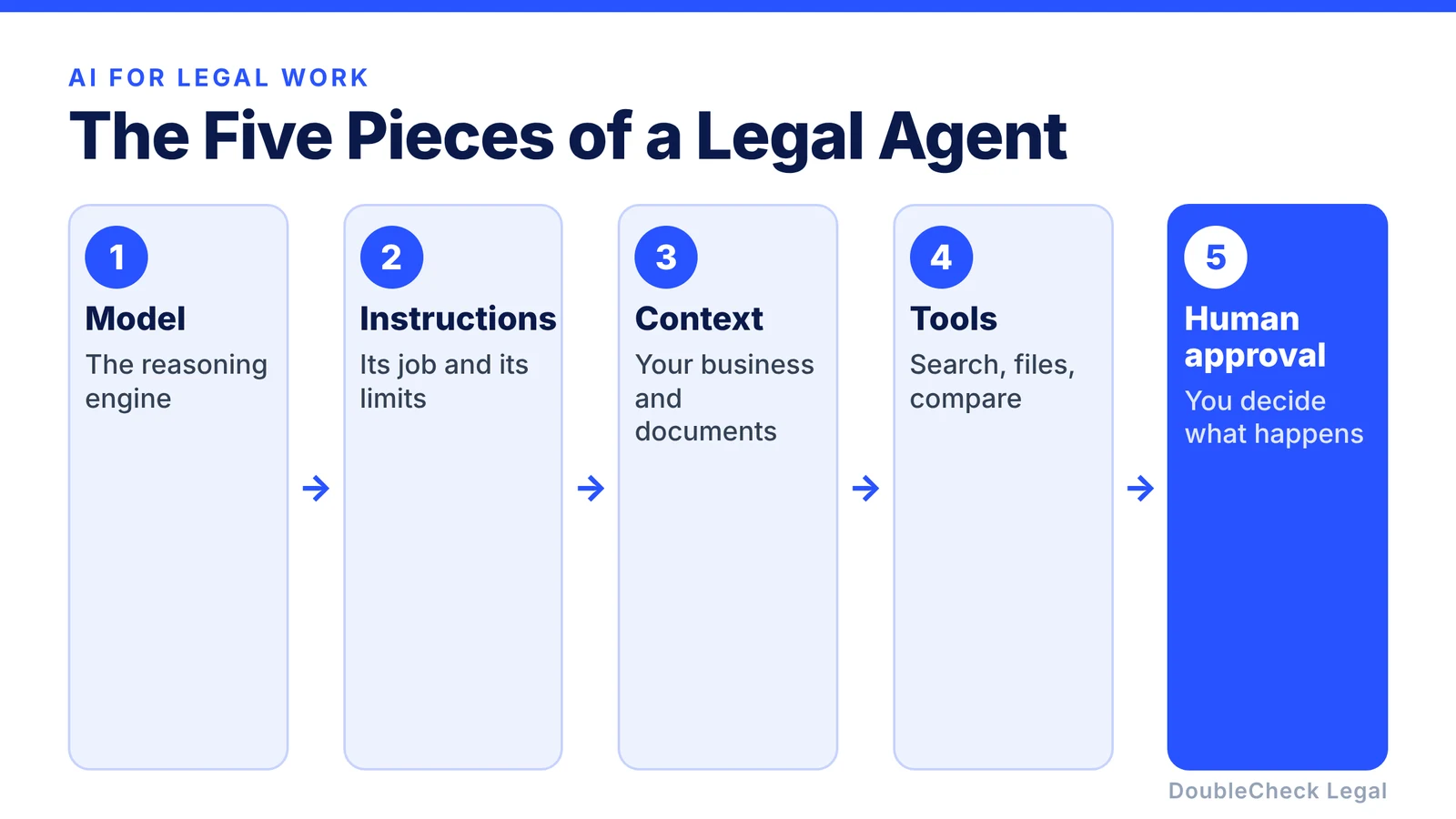
1. The model
The model does the reasoning. It reads instructions, evaluates information, decides what to do next, and writes the output. On its own, it is limited by the information it has, which is why the other pieces matter.
2. The instructions
An agent needs to know its job. For legal work, good instructions matter a lot:
“You are helping a U.S. software business prepare commercial contracts for review. Never assume a jurisdiction. Distinguish clearly between information in the contract and your own interpretation. Use authoritative sources when researching current law. Identify uncertainty instead of hiding it. Never sign, send, accept, or modify a contract without human approval.”
You want an agent that says “I don’t have enough information to determine this” when that is true, not one that invents a confident answer because you asked.
3. The context
The agent needs information about your situation: your company, jurisdiction, the transaction and parties, previous agreements, company policies, your preferred language, and your goals. A well-designed system can use that context during the task instead of making you explain your business from zero each time.
But access should be deliberate. Giving an agent access to every company document simply because it can is generally not a good security strategy. Give it what it needs.
4. The tools
Tools are where agents differ most from ordinary chat. A tool lets the agent interact with something outside the model. Examples:
- Web search to find current statutes, regulations, and agency materials.
- File search to retrieve information from contracts, policies, and PDFs.
- APIs and databases to look up structured information such as approved contract terms.
- Document tools to compare versions or produce a redline.
- Code execution to process large quantities of files or structured data.
- MCP connections. MCP, the Model Context Protocol, is one common way to connect agents to outside tools and systems.
The important idea is not the technology. It is that the AI no longer has to rely only on what it remembers. It can retrieve information from somewhere else.
5. Human approval
This may be the most important piece. Just because an agent can take an action does not mean it should be allowed to do so automatically.
For legal work, a sensible default is: research automatically, analyze automatically, draft automatically, and ask before taking consequential actions.
What can an AI agent do for legal work?
Here are practical examples.
Research an issue using sources
Instead of asking “Can we do X in California?”, you could instruct an agent:
“Research this question using current California government, statutory, regulatory, and court sources where relevant. Separate primary sources from secondary explanations. Tell me what you could not verify.”
The agent can search, open results, compare them, and write a source-backed summary. That is different from a model answering purely from memory. You should still inspect important sources yourself, because retrieving a source does not guarantee the agent read it correctly.
Review several documents together
Suppose you have a master services agreement, order form, data-processing agreement, security exhibit, and a prior version. An agentic workflow can work through them systematically:
“Review all five documents. Find inconsistent definitions. Identify obligations in one document that conflict with another. Build a table of payment, renewal, termination, liability, data, and IP provisions. Tell me which document controls if there is a conflict.”
Compare contracts against your preferred positions
If your company has a contract playbook (a preferred liability cap, acceptable auto-renewal terms, IP assignment you will not accept, preferred payment terms), an agent can compare incoming agreements against it and highlight the deviations. You or your attorney then focus on the exceptions instead of reading every page.
Prepare a contract before attorney review
An agent can collect the business terms, identify missing information, draft a first version, run a second review, check definitions, flag uncertain provisions, summarize, and list questions for counsel. Then you send the attorney the document, context, and identified issues instead of “can you start this from scratch?” That can make professional review more focused. For help finding that attorney, see our guide to finding a lawyer to review a contract you drafted with ChatGPT.
Organize a dispute or complicated situation
Emails, contracts, invoices, chat messages, dates, and amendments can be organized into a chronology:
“Create a timeline. For every event, cite the underlying document. Separate confirmed facts from allegations or assumptions. Highlight inconsistencies.”
That does not decide who is legally right, but it can improve your understanding before you speak with counsel.
Why sourcing matters more with agents
An agent doing more work does not eliminate AI errors. In some ways it makes verification more important, because one wrong conclusion can feed the next step. Imagine an agent that misreads a clause, searches the wrong legal question, finds an irrelevant source, uses it to revise the contract, and then summarizes its own revision. The result can look sophisticated while resting on an error from step one.
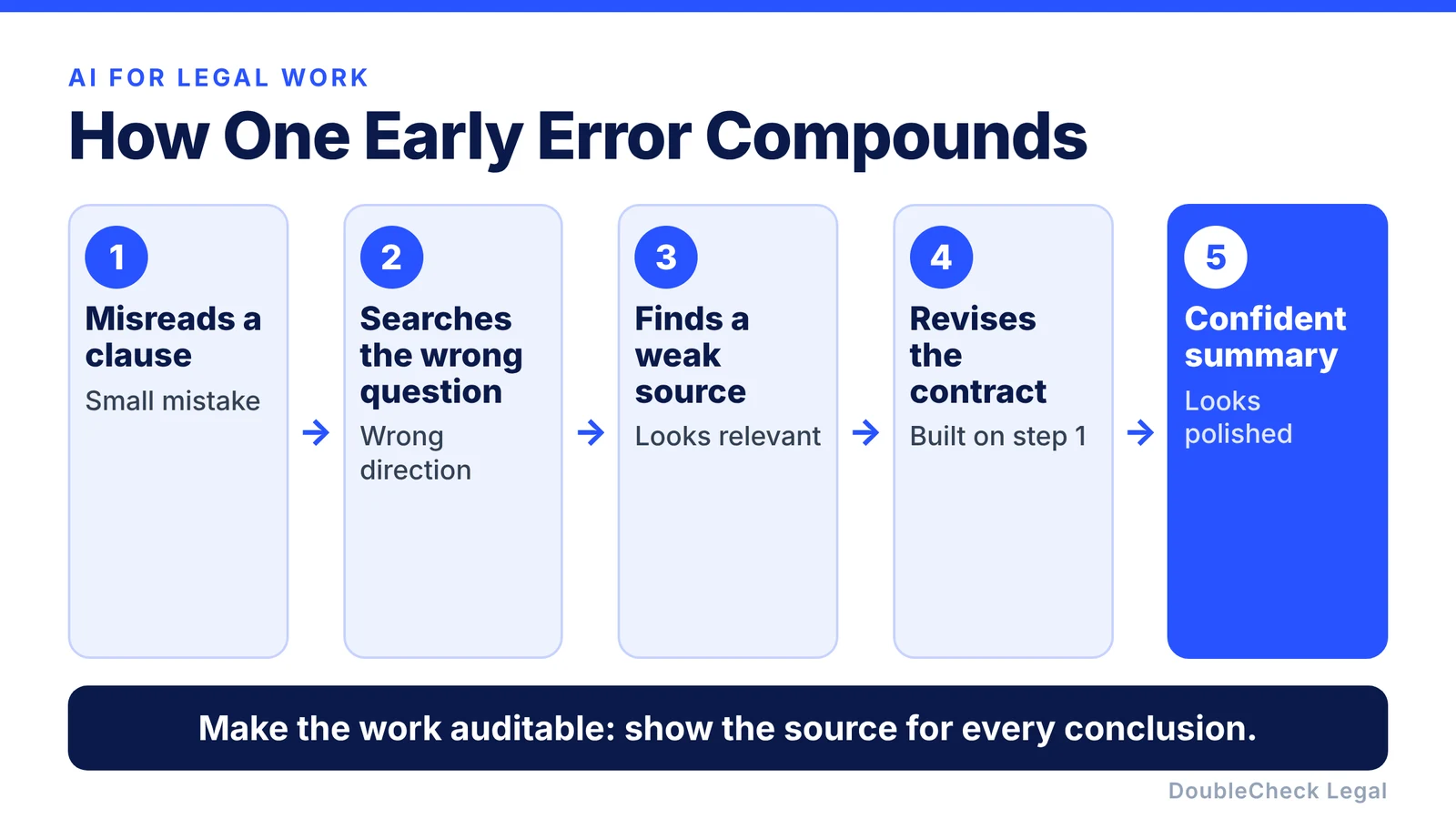
So make the work auditable. Ask:
“Show me the source behind every major legal conclusion.”
“Distinguish information in my documents from information you obtained externally.”
“Tell me which conclusions remain uncertain.”
The goal is not just to have an agent work on its own. It is to be able to check what it did.
Give legal agents limited permissions
A chatbot usually only talks to you. An agent may have tools, so permissions matter. A sensible approach is to start with read-only access:
- Allow it to read contracts, not delete them.
- Allow it to draft an email, not send it.
- Allow it to prepare contract changes, not accept the customer’s terms.
- Allow it to prepare a filing, not file it.
Agents become more useful as they gain capabilities, and more consequential too.
What about confidential information?
Agents can connect to sensitive business information: employee data, customer information, financials, trade secrets, confidential negotiations, or IP. Before connecting one, understand what it can access, what the AI provider does with that information, the retention settings, organizational permissions, which tools can send information outside, and your company’s confidentiality obligations.
The safest agent is not the one with access to everything. It is the one with access to exactly what the task needs.
Do not confuse an agent with an attorney
An agent may get very good at researching, organizing, searching, drafting, comparing, and checking. An attorney provides something different: professional legal judgment applied to your specific situation.
For consequential matters, a sensible workflow is: the agent does the preparation, sources support the work, you understand the issue, and an attorney reviews where professional judgment matters. That is more efficient than doing everything manually, and safer than trusting the AI completely. For a broader look at how this is changing legal work, see our article on agentic AI for entrepreneurs and lawyers, and for everyday prompts, our guide to using AI for legal work as a business owner.
Where DoubleCheck fits
DoubleCheck is built around this workflow: start with your existing question or document, use AI to do more of the preparation, look at what supports the result, identify what remains uncertain, and bring in an independent attorney when professional judgment is appropriate. DoubleCheck’s attorneys are independent professionals, and an attorney-client relationship is formed only if an attorney accepts the engagement.
The future of legal AI may be less about AI versus lawyer and more about AI agent, then verification, then an attorney when needed.
FAQ
What is an AI legal agent?
An AI legal agent is an AI-based system that can perform multi-step tasks using a model, instructions, context, and tools. Depending on the system, it may search sources, inspect files, compare documents, generate drafts, and organize results.
How is an AI agent different from ChatGPT?
A simple AI interaction usually means giving a model a prompt and getting a response. An agentic system can carry a task across several steps and use tools or external systems to complete it. Chat products can also offer agent-like features depending on their configuration and the tools enabled.
Can Claude be used as an AI agent?
Yes, Claude and other major models can be used in agentic workflows, where the model decides which steps or tools a task requires. What it can actually do depends on the product or system built around it.
Can an AI agent research legal questions?
An agent can help locate and organize legal information, including current sources when search is available. Important conclusions should still be checked against authoritative sources and reviewed professionally where appropriate.
Can an AI agent review contracts?
Agents can help summarize, compare, classify, and analyze contract language and prepare questions for further review. Whether a legal conclusion is correct can depend on facts, jurisdiction, and professional judgment.
Should I let an AI agent automatically send legal documents?
For consequential actions, a prudent workflow keeps a human approval step before anything is sent, signed, accepted, filed, or otherwise commits the business.
Can AI agents replace business attorneys?
Agents can automate more of the research, organization, drafting, and preparation around legal work. That does not make them equivalent to an attorney providing professional advice about a specific matter.
General information only. This article is not legal, tax, investment, or accounting advice.