How to Verify an AI-Generated Legal Document Before You Sign It
AI can produce an excellent first draft. It can also omit something important or include language that does not fit. Use this checklist before you sign or send an AI-generated document.
Key takeaways:
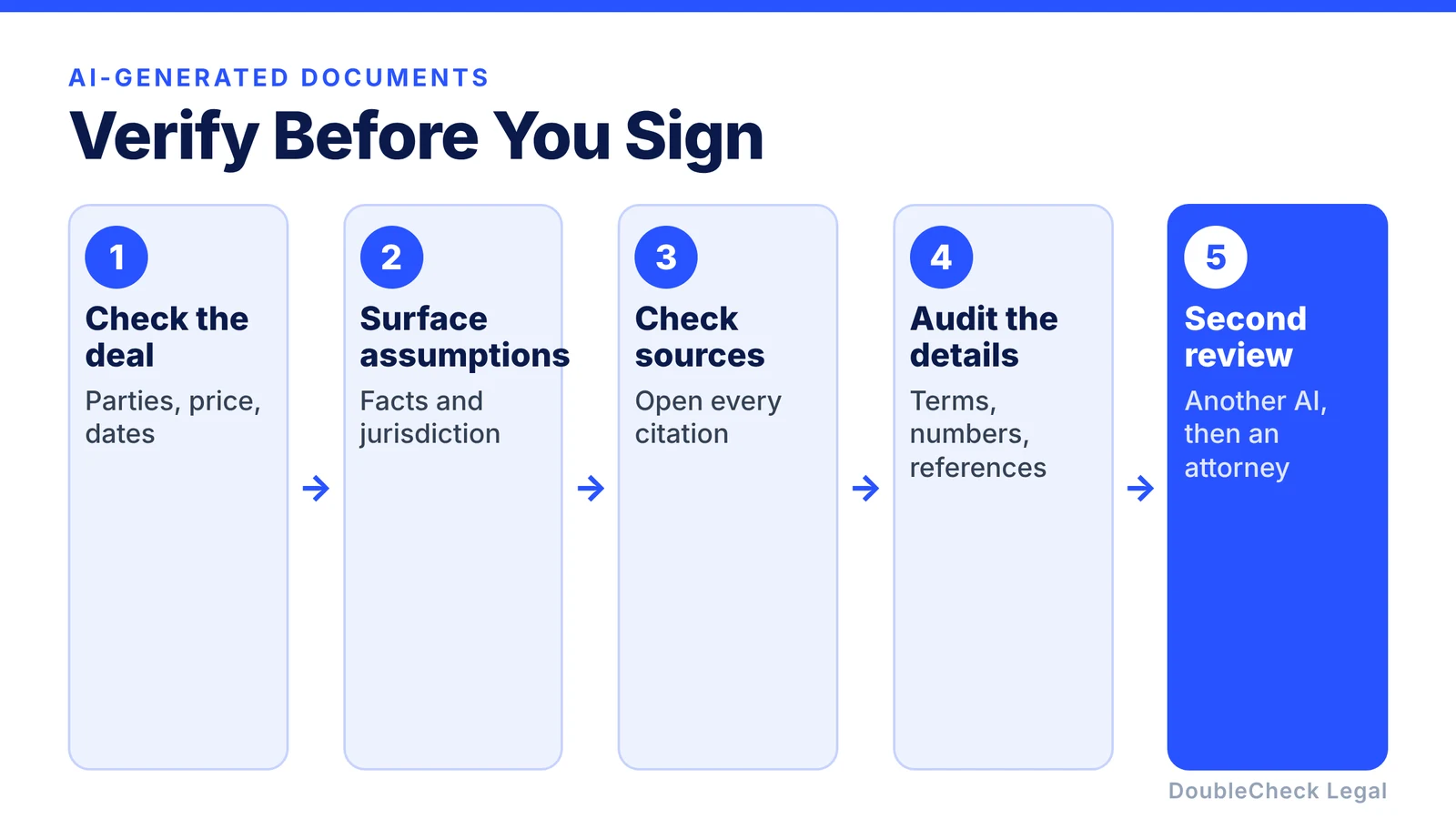
- Start with the deal: parties, price, dates, and obligations.
- Ask the AI to list its assumptions, especially about jurisdiction.
- Open and check every important citation yourself.
- Audit definitions, cross-references, amounts, and exhibits.
- Let another review challenge the draft, and add an attorney when the stakes are high.
You asked ChatGPT to draft an NDA, or Claude created your freelance agreement, or Gemini helped you rewrite a customer contract. The document looks professional. How do you verify that it is actually ready to use?
1. Start with the deal, not the legal language
Before checking clauses, ask the simplest question: does this document accurately describe the deal we actually agreed to? Check:
- legal names of the parties and addresses where relevant,
- effective date, duration, renewal, and termination rights,
- services or products and deliverables,
- price, payment schedule, and deadlines,
- anything agreed verbally that should be in writing.
AI cannot verify a business fact you never gave it. If the document says $5,000 and you agreed to $6,000, excellent drafting does not fix the problem.
2. Ask the AI what it assumed
Take the finished document and ask:
“List every factual or legal assumption you made when drafting this agreement.”
“What information was missing?”
“Which provisions could change depending on jurisdiction?”
This is one of the easiest ways to expose hidden problems. Maybe the AI assumed California law applies and your company is in Texas. Maybe it assumed a freelancer is an independent contractor without knowing how the relationship actually works. Make the assumptions visible before relying on the document.
3. Run a basic contract checklist
Different contracts need different terms, but for many business agreements check at least:
- Parties: who is actually entering the agreement?
- Scope: what exactly must each side do?
- Payment: how much, when, and under what conditions?
- Term and termination: when does it start and end, and how can either side leave?
- Intellectual property: who owns new work and pre-existing materials?
- Confidentiality: what must stay private?
- Liability and indemnification: what happens if something goes wrong, and who covers third-party claims?
- Governing law and disputes: which jurisdiction applies, and how are disputes handled?
- Signatures: are the right people and entities signing?
Not every agreement needs every provision. The point is to make sure the AI did not just produce something that looks complete. For two common examples, see our guides to writing an NDA and writing a freelance contract.
4. Build a checklist for that type of contract
Ask an AI agent or research tool to help, with sources:
“This is an independent contractor agreement for a California business. Research authoritative sources relevant to this type of agreement and create a checklist of issues I should verify. Cite every source.”
There is usually not one official template that tells you how every private contract should be written. Instead, look for authoritative material on the legal issues in your agreement:
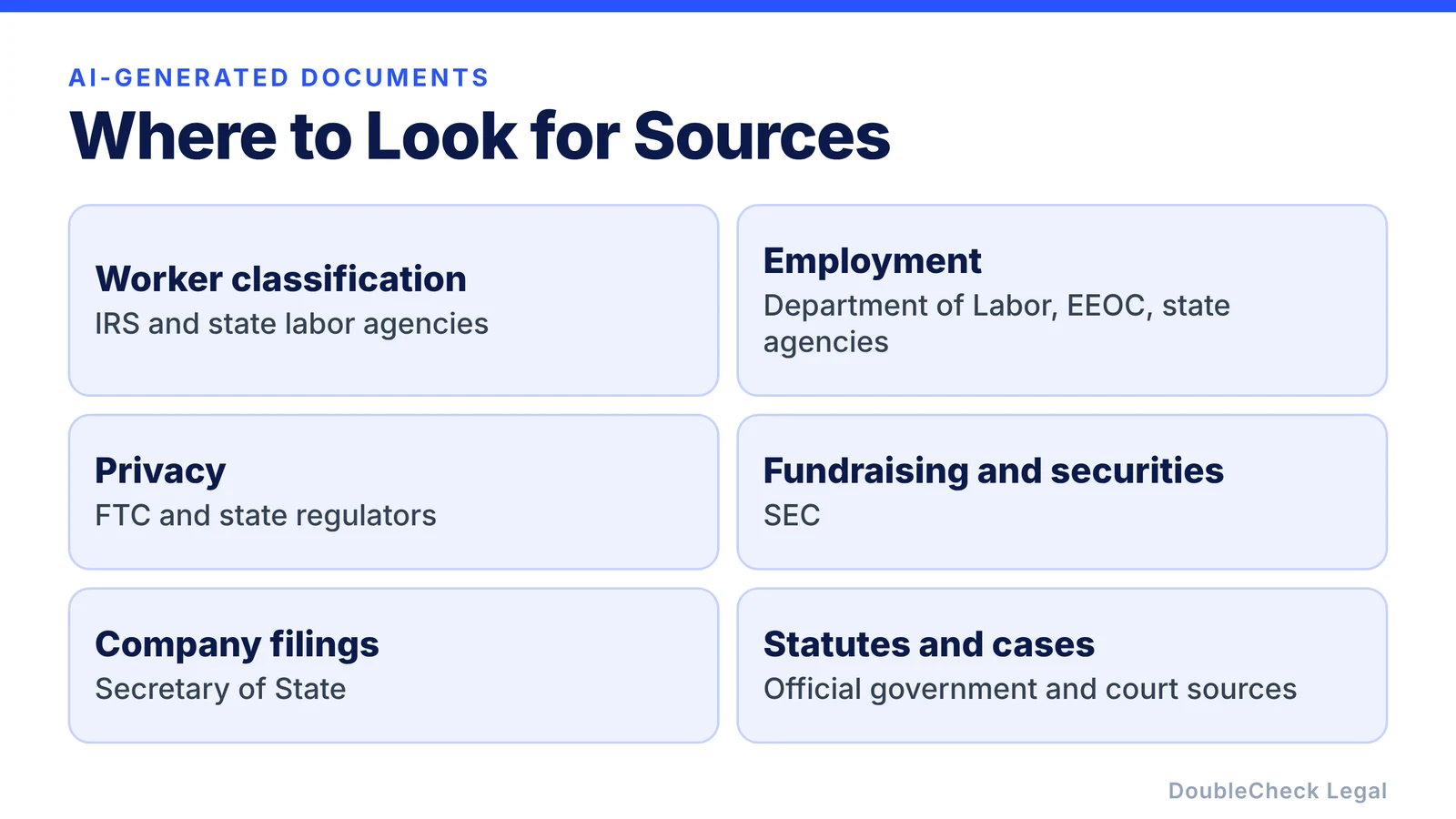
The key is not letting the AI build a checklist from memory. Ask it to show where each item came from. For more on how agents work with sources, see AI agent vs. chatbot for legal work.
5. Verify every important citation
If the AI says “California law requires X,” ask what source supports it, then open the source and check:
- Does it exist?
- Is it current?
- Does it actually say what the AI claims?
- Does it apply to your jurisdiction?
- Are there exceptions?
Do not assume a citation is correct because it has an official-looking case name or statute number. Even specialized legal research tools have been found to produce incorrect information: a 2024 Stanford study of leading legal research tools, “Hallucination-Free?”, found hallucination rates between 17% and 33%. Those were older systems, but the lesson stands.
6. Check the document mechanically
Some AI contract mistakes are not sophisticated legal errors. They are editing errors. Search the whole document for undefined capitalized terms, defined terms never used, wrong company names, references to sections that do not exist, contradictory dates, inconsistent amounts, duplicate provisions, missing exhibits, broken numbering, blank placeholders, wrong state names, and incomplete signature blocks.
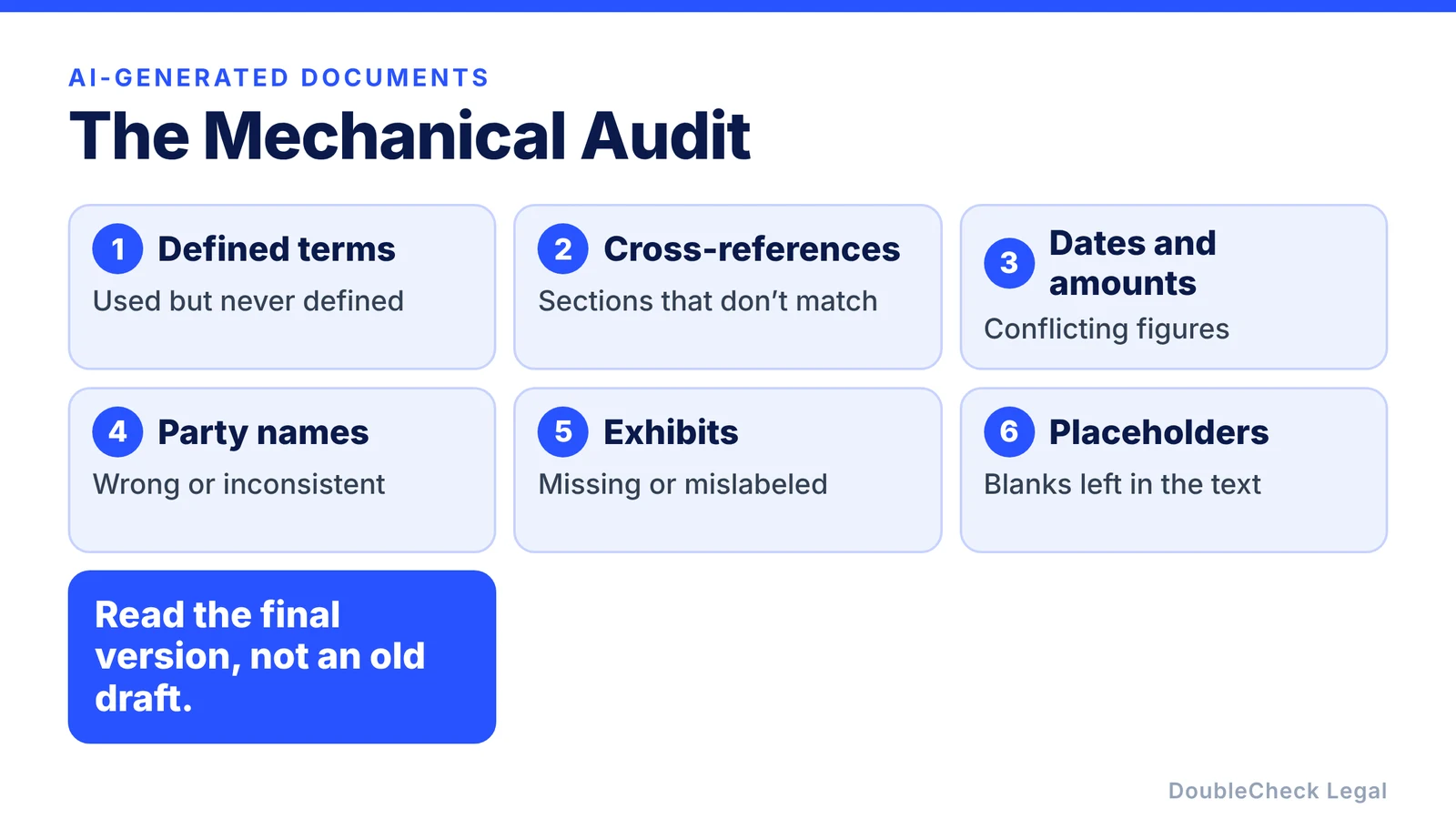
For example, a clause may say “as defined in Section 8.2” when Section 8.2 has nothing to do with that subject. Ask your AI:
“Perform a mechanical consistency audit. Check every defined term, cross-reference, date, dollar amount, exhibit reference, section number, and party name.”
Then manually inspect whatever it flags.
7. Make another AI attack the document
Do not only ask “Is this contract good?” Try:
“Assume this agreement contains serious mistakes. Find them.”
“Review this entirely from the other party’s perspective.”
“What are the five provisions most likely to cause a dispute?”
“Which clauses could have consequences substantially larger than the contract value?”
You can also use a different model for the critique. Which one to pick is covered in ChatGPT vs. Claude vs. Gemini for legal work.
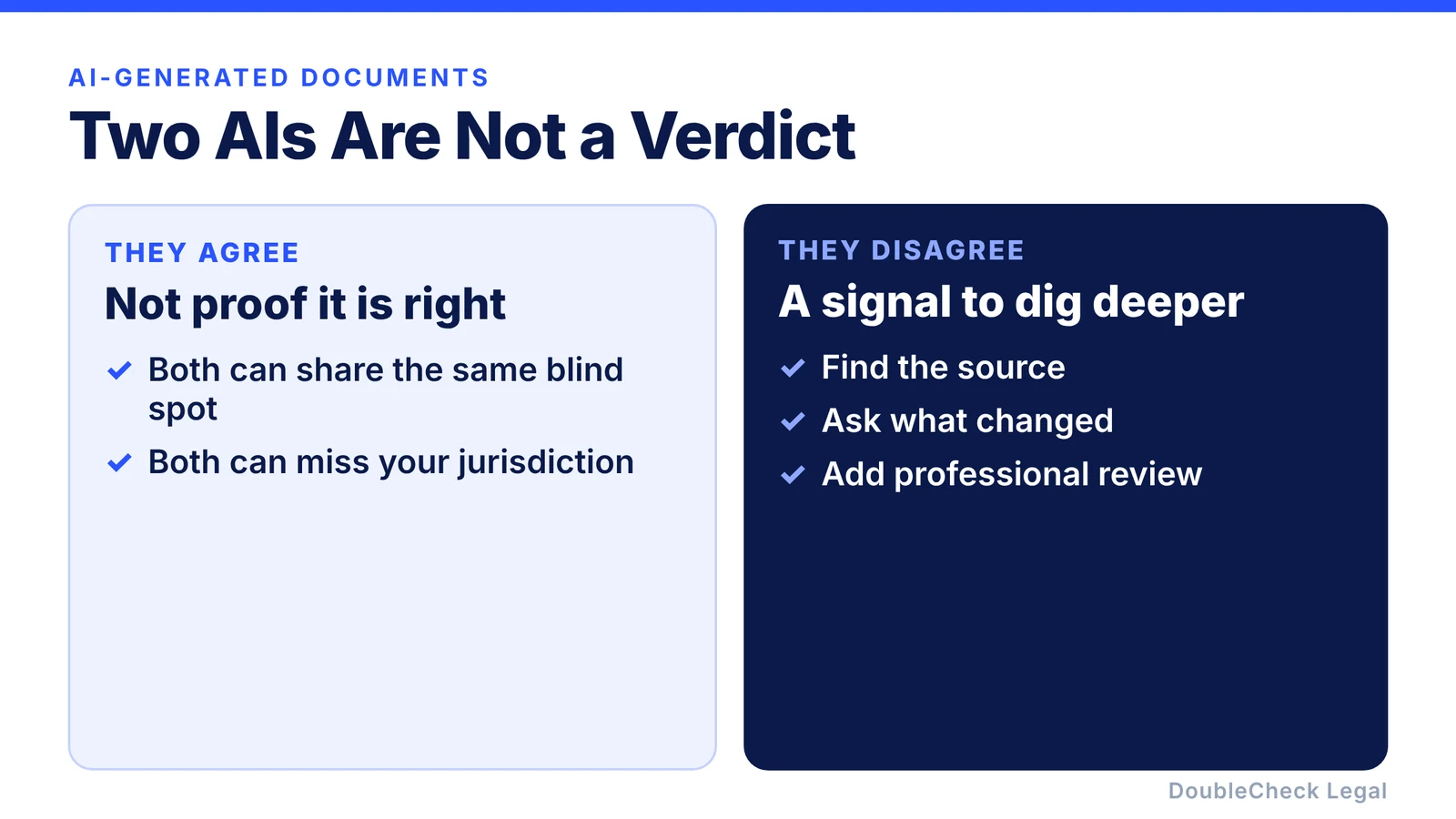
Two AIs agreeing does not equal legal verification. But disagreement is an excellent signal to investigate further.
8. Check that you are reviewing the final version
Formatting sounds minor until a missing schedule or signature page changes what people actually sign. Check the title, party names, section hierarchy, exhibits and schedules, signature blocks, dates, attachments, referenced policies, and amendment language, and make sure the final PDF contains everything the contract refers to. Review the actual final version, not an earlier AI draft.
9. Decide whether the consequences justify an attorney
Ask one question: what happens if this document is wrong? For a simple, low-value agreement your risk tolerance may be different. But if it affects important intellectual property, founder ownership, employees, fundraising, securities, major customer revenue, substantial liability, regulatory obligations, litigation, taxes, or the sale of the business, professional review becomes considerably more valuable.
AI should help you reduce unnecessary legal work. It should not encourage you to take large risks without understanding them. If you want to keep the cost down, see our guide to saving money on legal work with AI without skipping a lawyer.
How to find an attorney to review an AI-generated document
You can contact a law firm or attorney directly, ask an attorney your company already uses, use a professional-services marketplace, or look for a lawyer-referral service, which state and local bar associations commonly run. When you reach out, be specific:
“I drafted this agreement with AI. I do not need someone to start from a blank page. I would like a review of the existing document, particularly IP ownership, liability, termination, and anything the AI may have missed.”
For more on what to send and what to ask, see how to find a lawyer to review a contract you drafted with ChatGPT.
Where DoubleCheck fits
DoubleCheck is built around the fact that business owners already generate legal work with AI. Bring the NDA you created in ChatGPT, the freelancer contract you drafted in Claude, or the customer agreement you analyzed in Gemini. DoubleCheck can help you analyze the document, identify missing information, look at the relevant sources, and flag the parts that deserve more attention. When you want professional advice, it gives you a path to independent attorneys, who are independent professionals; an attorney-client relationship is formed only if an attorney accepts the engagement.
The idea is not to restart your work. It is to continue from where the AI left off.
The final AI-contract checklist
Before using an AI-generated legal document, ask:
- Does it describe the real business deal?
- Are the parties, dates, amounts, and obligations correct?
- Did the AI identify its assumptions?
- Is the correct jurisdiction being considered?
- Does it contain the provisions appropriate for this type of agreement?
- Are important legal conclusions supported by authoritative sources?
- Did you personally open and check those sources?
- Are the definitions and internal references consistent?
- Did another review challenge the first AI’s work?
- Are you comfortable with the consequences if something is still wrong?
- If not, has a qualified attorney reviewed it?
If you cannot confidently answer these, the document may not be ready to sign.
FAQ
How do I check a contract written by ChatGPT?
Check the business terms first, then identify assumptions, verify the jurisdiction, review important provisions, inspect supporting sources, check definitions and cross-references, and consider attorney review when the consequences are significant.
Can AI verify an AI-generated legal document?
AI can help with a second review, find inconsistencies, research issues, and create checklists. It cannot guarantee that another AI-generated document is legally correct or appropriate for your circumstances.
Should I use another AI to review my contract?
A second model can be useful for finding omissions or disagreements. Agreement between two models should not be treated as proof that the document is correct.
Do I need a lawyer to review an AI-generated contract?
Not every document carries the same risk. Attorney review becomes more important when the agreement involves significant money, intellectual property, employment, financing, regulatory obligations, litigation, or other consequential issues.
Where can I find a lawyer to review an AI contract?
You can contact law firms or attorneys directly, use professional marketplaces, use lawyer-referral programs run by state or local bar associations, or use an AI-first legal platform such as DoubleCheck.
What should I tell the lawyer?
Tell them AI created or assisted with the document, explain the underlying business deal, identify the applicable jurisdiction, and state exactly what you want reviewed. That helps them understand your workflow instead of starting from zero.
General information only. This article is not legal, tax, investment, or accounting advice.